A concept email client you'll wish was shipping.

Email Clients
Forgot Who
They Work For.

Hundreds of emails, zero control. MMWBMail lets you pivot to any sender instantly, bulk-delete and block in one move, and sort through noise without ever losing your place. This is what inbox control actually feels like.

14 features
proposed
6 feature
themes
1 rule:
intent first
MMWBMail
From
Subject
Date
no active filters — hover a sender to focus
JR
James Rivera
Re: Project handoff — final version attached
9:41
LI
LinkedIn NL
A new project request is available
Feb 24
SF
State Farm SVC
Reminder — payment due in 5 days
Feb 23
LI
LinkedIn NL
You're appearing in 14 searches this week
Feb 23
ZS
Zack S.
Figuring out the premium — calculations inside
Feb 22
AF
Affirm SVC
Your Affirm payment summary
Feb 22
LI
LinkedIn NL
A new project request is available
Feb 22
LI
LinkedIn NL
Marcus Webb sent you a message
Feb 21
User Intent First Relationship-Aware Routing Held for Safety Focus Filtering Spoof Detection Bulk Delete + Block Smart Folders AI Formatting Time-Based Retention Pattern-Aware Filters  
System Failure

Today's Email Experience
Feels Like Fighting the Interface

The point is not that it looks old. The point is that it makes your attention leak out through a thousand tiny interruptions, detours, and repeated corrections.

01 UX failure

Losing your place, over and over

Every time you want to narrow by sender or date, you get bounced out of your inbox. Find the view, lose the thread, start again. That friction compounds all day long.

02 intent ignored

Corrections that never stick

Dragging a message back to inbox should be a permanent correction. Most clients treat it like a polite suggestion, then make the same mistake again next week.

03 control buried

Bulk actions buried under detours

Blocking a sender still takes a search, a selection pass, a delete, and then a separate trip into rules. Most users never find it. The junk keeps coming.

If your inbox can't be trusted, email stops being a tool and becomes a liability.
The Root Cause

Why Conventional
Clients Keep Failing

They optimize for platform risk, global scale, and their own support costs. The recipient — the only person who actually knows what matters — is an afterthought.

Five root failures
01

They let inference outrank explicit intent.

Platform motive: Your correction is expensive to honour. Guesswork is cheaper.

02

They treat relationships like they don't exist.

Platform motive: Global policy scales. Per-relationship graphs don't.

03

They hide risky mail instead of surfacing it with context.

Platform motive: Silent burial creates no support tickets. Visibility would.

04

They bury the controls that fix false positives.

Platform motive: Fewer block actions means fewer deliverability complaints from senders.

05

They avoid blunt identity truth because it creates support burden.

Platform motive: Spoofing warnings escalate. Vague warnings don't.

The governing rule
"The user should be the highest authority. Everything else is implementation detail."
The Thesis

Email Built Around
Your Relationships

Who you've replied to, who's in your contacts, and what threads are active — these are real signals. Email is not anonymous inbound noise.

"Known sender plus active thread should never be treated like anonymous spam."
— MMWBMail Thesis
Inbox Focus

Pivot / Focus Filtering

Click any sender and your inbox instantly collapses to just their emails. No folder switching. No lost place.

"Stay in context. Stop hunting folders."

Pattern-Aware Subject Filter

Focus by subject and MMWBMail automatically detects the pattern — so filtering "Invoice" catches every invoice thread, not just that one.

"Exact match is too dumb for real inboxes."

Sender Stat Bar

When focused on a sender, a compact strip shows total count, unread count, and most recent date without hijacking the UI.

"Fast context, zero clutter."
Safety & Trust

Held for Safety

A third state beyond Inbox and Junk. Known contact triggers phishing patterns? Message stays visible with amber flag. One click release with 'Mark as Safe.'

"Visibility beats burying."

Spoof Detection

If display name and sending domain don't match, MMWBMail shows an inline warning in sender metadata with a red treatment distinct from amber holds.

"Put the truth where it belongs: next to identity."
See it live

The Held for Safety state is fully interactive in the demo — try flagging a known contact and releasing it.

Sender Control

Bulk Delete with Block

Right-click sender, delete all messages across all folders, see exact count in a confirmation modal, and optionally block in the same step.

"One action, not a two-step scavenger hunt."

Prioritize Sender → Smart Folder

Right-click, prioritize sender, and MMWBMail creates a persistent starred smart folder scoped to them. Filter is pre-applied and survives sessions.

"Turn relationships into structure."

Pin to Top

Pin any email to the top of whatever view you're in. Pins respect active filters and work per view — priority travels with context.

"Priority should travel with context."
Third State
Inbox Junk Held ⚑

Stop Burying Risk.
Make It Visible.

Junk folders are where real communication goes to die. If something is suspicious but comes from a known relationship, the correct move is to show it, explain it, and let you decide.

01 Amber flag for suspicious messages from known senders — visible in the inbox, never silently buried.
02 Clear reasons shown alongside trust signals — you see exactly why it was held and what's known about the sender.
03 One-click 'Mark as Safe' that sticks permanently — the system learns and never holds that sender again.
Inbox — 3 messages
JR
James Rivera
Re: Project handoff — I attached the final version…
9:41 AM
SB
Sarah Blake ⚑ Held
Suspicious link detected — known contact
NL
Morning Brew Newsletter
Auto-managed · Kept 30 days
7:00 AM
Signal Breakdown — Sarah Blake
Known contact✓ Confirmed
Replied to before✓ 4 times
Suspicious link pattern⚠ Detected
Link previously clicked⚠ No history
Trust context is strong. Held for review rather than junked. You decide.
Power Moves
04 total

Four moves.
Zero friction.

01
Focus without leaving

Click any sender, subject, or header and your inbox instantly collapses to that context. No folder switching, no lost place.

Switch views. Lose your place. Rebuild context. Context in 1 click The action stays inside the inbox instead of throwing you into a different mode.
02
Delete and block together

One confirmation flow removes all messages from all folders and blocks the sender across the board. No separate settings detour required.

Search → select-all → delete → rules 1 step
03
Instant sender smart folders

Right-click any sender, prioritize, and MMWBMail creates a starred folder scoped to them — filter pre-applied, ready immediately, and there every time you come back.

Create folder → set filter → test Right-click
04
Pin per view

Pin any message to the top of whatever view you're in. Pins respect active filters and are scoped per view — priority travels with context, not against it.

Flag + manual scroll to find Always visible
AI-Powered

Email Controls That
Surface Themselves

Unsubscribe links shouldn't require a magnifying glass. MMWBMail uses AI to surface and reformat the controls you actually need — consistently, every time.

01
Automated Search & Link Creation AI

AI scans each email for the unsubscribe link and surfaces it directly in the action menu — clear, consistent, and always one tap away.

02
Dynamic Scaling & Reformatting AI

Footer links reformatted into tappable buttons on mobile — no matter how badly the sender designed their email.

03
Intelligent Spell Checking — Name Comparison AI

Spell checking compares the name you're emailing against your contact card to ensure correct spelling. Professionalism, protected automatically.

"Unsubscribe should be one tap — not a forensic investigation of a 6px footer."
Before
Uncontrolled
You received this because you opted in at some point. To manage preferences visit our website. unsubscribe · view in browser · privacy
ACME Corp. 123 Main Street, Springfield 00000
6.5px · impossible to tap
After · MMWBMail
AI-surfaced
AI-surfaced actions
Always visible · Always tappable
Image Viewing

Images should feel
like part of the message.

Most mail clients make image-heavy messages feel clumsy to inspect. MMWBMail treats visual content like something you may actually need to review carefully, not just scroll past.

Visual control Stay in context

Review visuals without breaking your flow

Instead of forcing you into a clumsy viewer or tiny inline previews, the concept is simple: images should open cleanly, stay anchored to the message context, and make it obvious what you are looking at.

Larger focus state
Move from message list to image review without losing orientation.
Thumbnail awareness
Scan multiple visuals quickly instead of opening one blind attachment after another.
Action stays close
Save, reply, forward, or continue triage without a jarring mode switch.
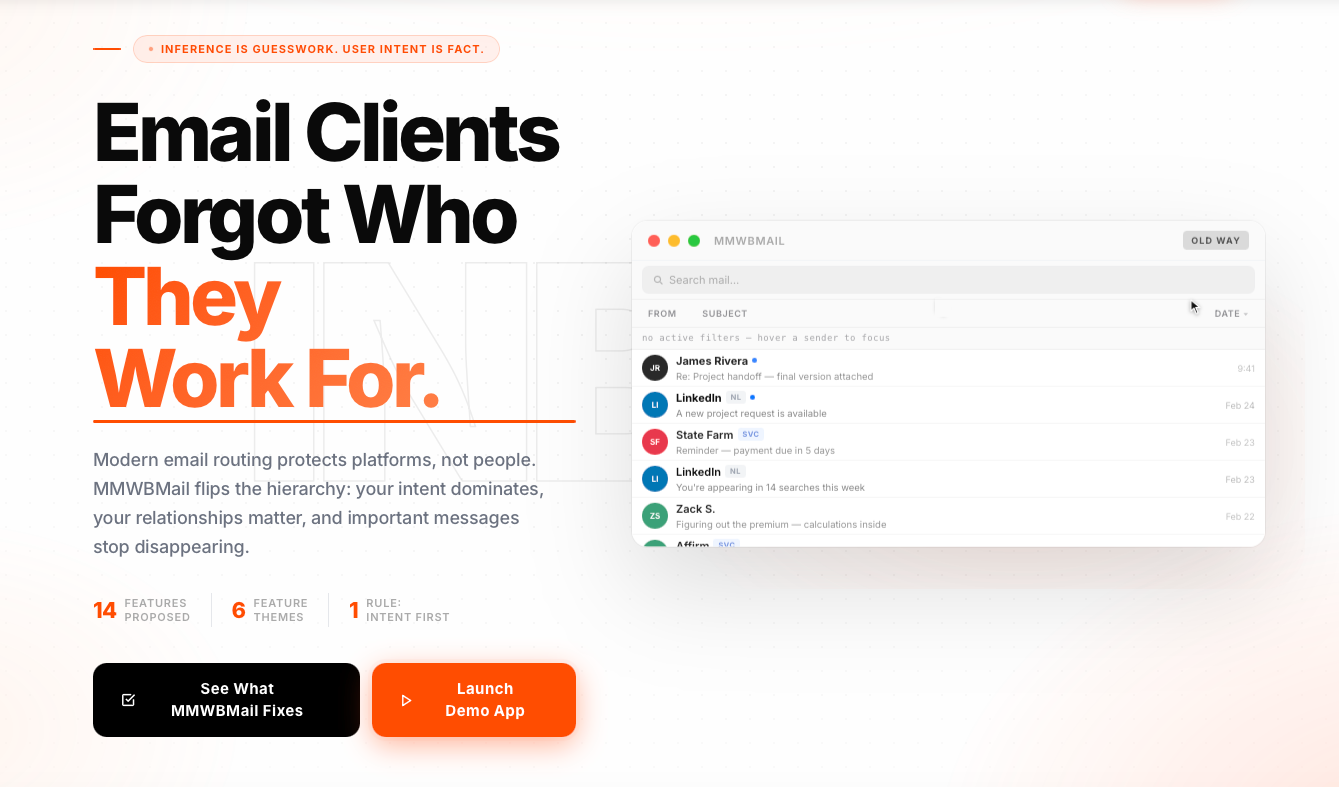
Image review
MMWBMail concept image shown inside the viewer demo
4 images in message
Keep reviewing
Making My World Better

Better software
should feel obvious
the second you touch it.

MMWBMail is one example of the standard we hold. We rethink workflows, interfaces, and system logic so the result does more than look polished — it clears friction, reveals what matters, and gives teams back control.

Move revenue
Interfaces that convert hesitation into action
Make signals usable
Systems that make buried signals usable
Give time back
Workflow redesign that gives time back
What we build into products like this
01
Interfaces that convert hesitation into action

We've rebuilt product flows, onboarding, and decision points so the experience pulls people forward instead of losing them right before the moment that matters.

02
Make signals usable

Dashboards, automation, and AI features should not add noise. We design them to expose the right insight at the right moment, in a form people can actually act on.

03
Give time back

The biggest losses are often invisible. We find the drag teams have normalized, then rebuild the experience so routine work stops stealing attention, speed, and trust.

Interested in building something sharper?
We work on products, workflows, and system logic. Tell us where you are — the conversation shapes itself from there.
Where are you right now?
This still opens your email client exactly like before. No embedded form handlers were changed.
← Back to the Workshop