Elevate
Shape the communication around its intended outcome. Elevate works with context and the writer’s original intent, helping develop the message rather than merely changing its tone.
Intent & impact
CONCEIVED & DIRECTED BY BEN KLAIBER
A communication workspace,
designed around the work.
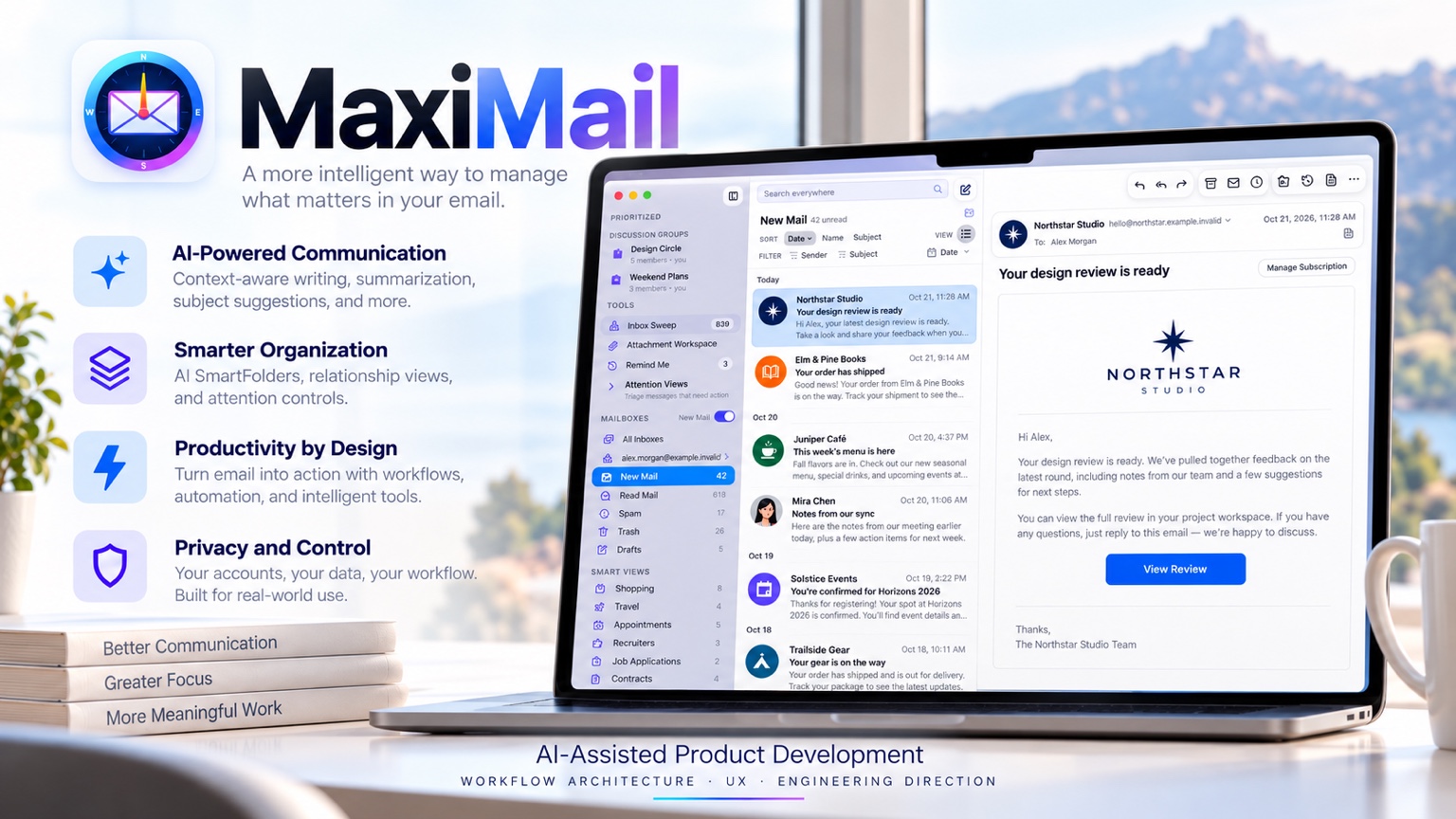
AI-assisted writing, rich-media Snippets, and an attachment workspace for bookmarking, conversion, and OCR. The product decisions and engineering work behind MaxiMail, conceived and directed by Ben Klaiber.
01 / PRODUCT STRATEGY
A client response may need a reusable explanation, a visual, information trapped in a scan, and a different tone for its audience. Those needs shaped MaxiMail.
I approached email as a collection of connected work problems. People build their own libraries of responses, download attachments into temporary folders, open separate tools to convert images or extract text, and search old conversations to reconstruct a relationship. Each detour interrupts the task that prompted it.
MaxiMail brings those activities into the communication environment. Rich-media Snippets retain reusable knowledge. Attachment Workspace makes received material easier to collect, transform, and reuse. Relationship and attention views organize the surrounding context. The AI tools address specific writing decisions rather than reducing everything to a generic rewrite.
My product strategy was to connect these capabilities into useful sequences: find material, adapt it, combine it with reusable content, and communicate with the audience in mind. That required workflow architecture, not simply a larger feature list.
02 / COMMUNICATION DESIGN
I separated five communication needs into distinct tools. The result gives writers more specific control than a single AI button asked to do everything.
Shape the communication around its intended outcome. Elevate works with context and the writer’s original intent, helping develop the message rather than merely changing its tone.
Intent & impact
Refine clarity and expression with selectable writing styles, a preview, and further revision. This separates editorial finishing from the more substantial communication decisions handled by Elevate.
Editorial control
Bring cultural expectations into the writing process. The assistance addresses how a message may be received by its audience, adding a dimension that a generic “make this professional” instruction misses.
Audience awareness
Work through factual questions within the communication workflow. Research assistance stays close to the claim or explanation being developed, without requiring a separate conversation disconnected from the draft.
In-context fact assistance
Develop subject lines from the message’s context. Subject framing becomes a focused editorial decision, distinct from rewriting the body.
Contextual framing
Native intelligence: eligible features use Apple Intelligence-first routing. Availability and processing paths depend on the feature and device. [1]
SNIPPETS / REUSABLE RICH CONTENT
Snippets combine formatted text, images, GIFs, built-in variables, and shortcuts. A reusable response can carry its explanation and visual material together, with variable elements adapted for the communication.
The product decision: treat repeated communication as a reusable resource. An onboarding explanation, support walkthrough, or project follow-up can combine consistent wording with visual context and variable content.
VISUAL COMMUNICATION
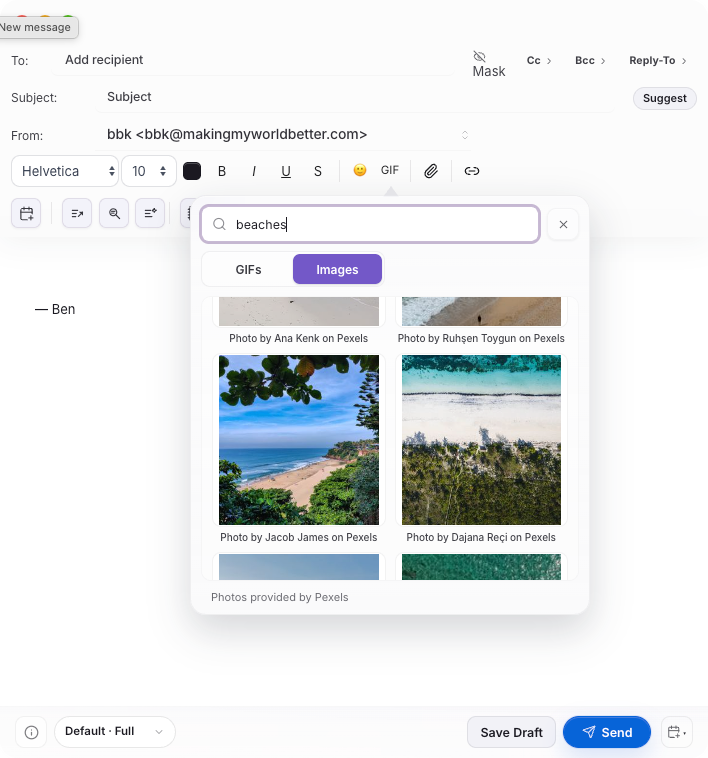
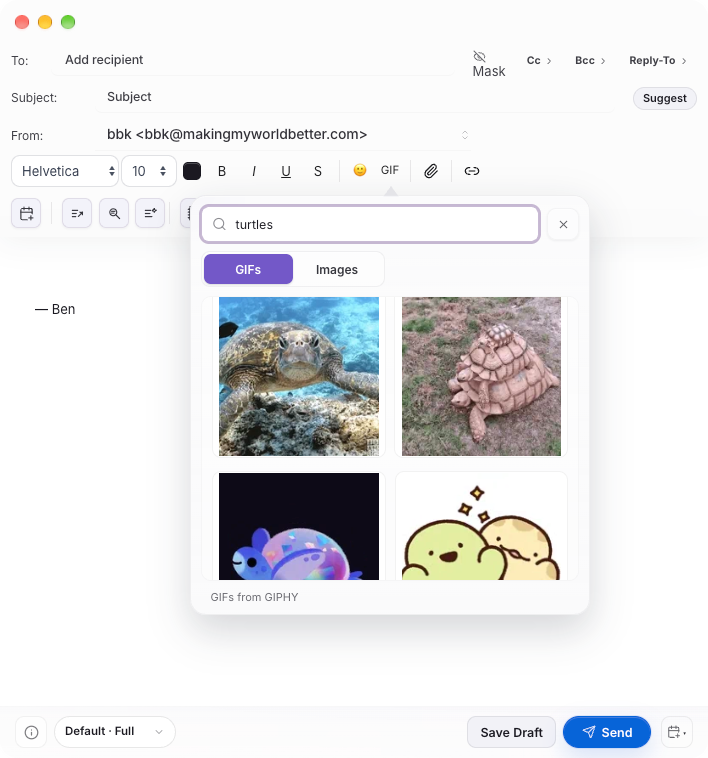
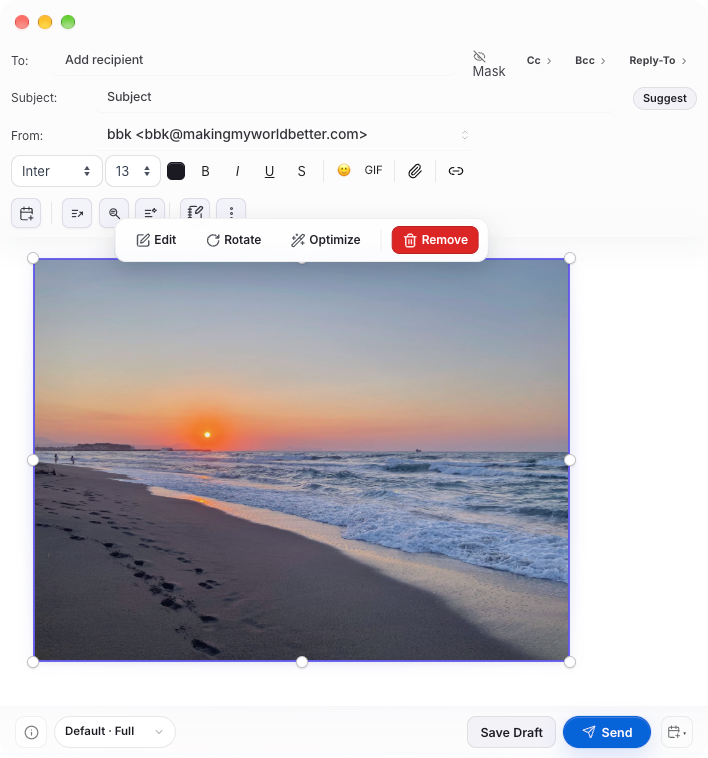
Pexels photography and GIPHY GIFs share a searchable picker. Inline image tools then handle sizing, editing, rotation, and optimization. I designed this as part of composing a richer response, alongside Snippets and stationery.
03 / WORKFLOW ARCHITECTURE
Mail volume is a poor proxy for importance. MaxiMail combines relationship context, tunable Smart Views, and sender-level actions so the user can shape what stays in focus.
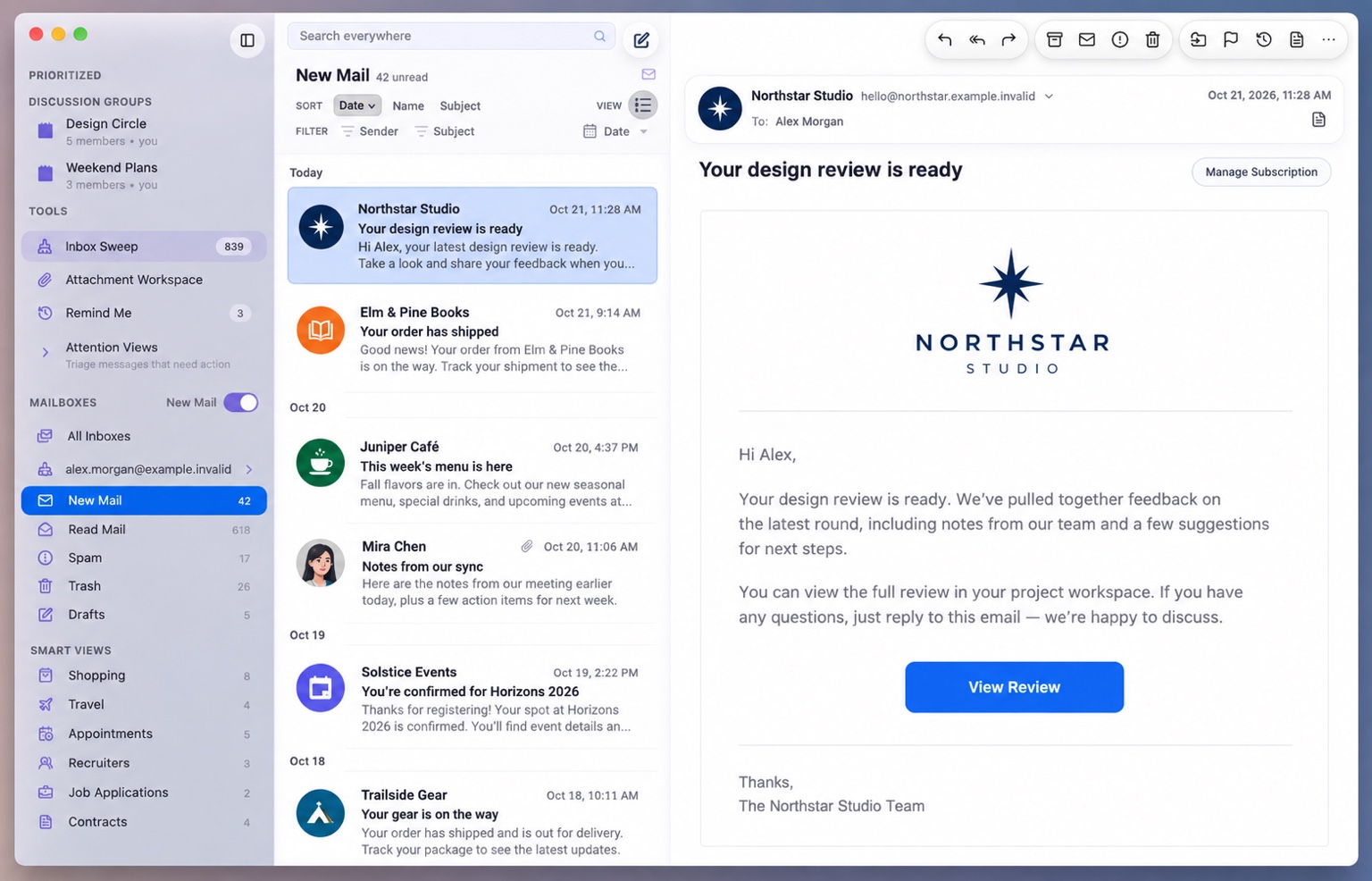
AI-enriched categories connect mail to activities such as applications, contracts, appointments, and travel. Importance and recency thresholds let the user tune category relevance instead of accepting a fixed classification as the final answer.
Focus on Sender, Relationship Views, and Discussion Groups make a person or ongoing discussion the organizing context. This supports following a relationship across messages rather than repeatedly reconstructing it through search.
Apply retention and cleanup decisions at the sender level. Keep Only Recent is designed for communication whose older versions lose usefulness, while bulk sender actions reduce repeated, message-by-message handling.
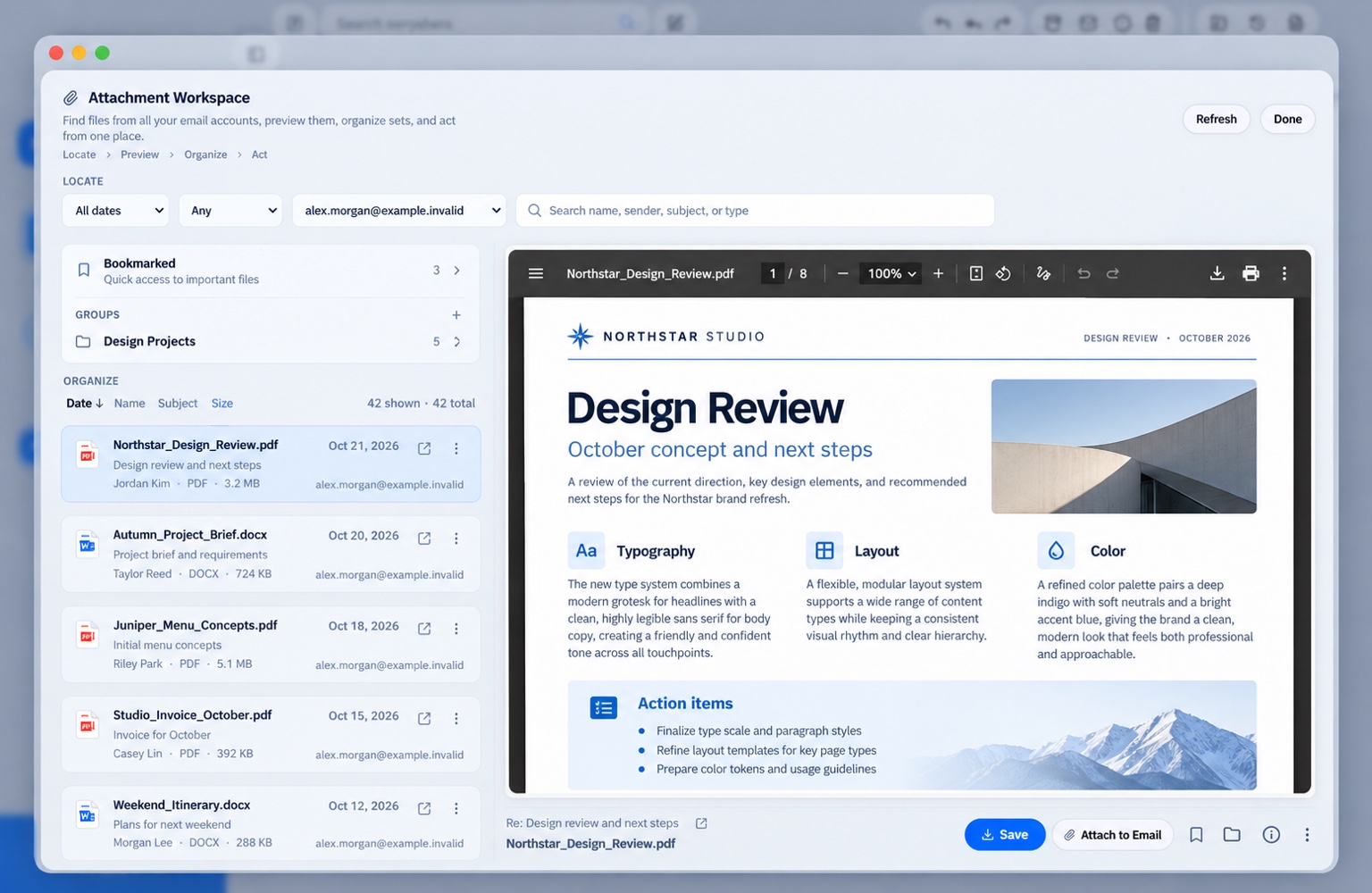
Search attachments across connected accounts, bookmark high-value files, and organize related material into named groups. The collection can follow a project rather than whichever inbox received each file. The Bookmarked area and Design Projects group shown here illustrate that approach.
Convert a supported image to another format inside the workspace instead of downloading it, opening a separate converter, exporting, and bringing it back. File preparation stays beside file discovery and reuse.
Extract text from a scan or image in one click, then format the output for its next use. Source material can contribute to a reply or document without a separate OCR utility and manual retyping.
WHY THESE FEATURES BELONG TOGETHER
A project update can draw on a bookmarked reference, text extracted from a scan, a converted image, and a rich-media Snippet. These are connected tasks. Designing them together reduces the need to assemble the workflow across unrelated utilities.
Example workflow · The tools can also be used independently. [3]
FROM CONCEPT TO ARCHITECTURE
Rich composition, file transformation, contextual views, and multi-provider synchronization need different services. The architectural work is connecting them without fragmenting the experience.
AI-assisted writing, rich-media composition, attention views, and the file workspace.
Local SQLite, native media and document integrations, protected credentials, and coordinated state.
Provider-specific synchronization and operations behind the shared application experience.
Shared state, specialized views. Relationship, attention, and mailbox views depend on a common ordered state model. Centralizing that responsibility limits competing interpretations of the same account while letting each view support a different workflow.
Native capabilities where they add value. macOS integrations support document and media work, notifications, Contacts, and Calendar. The local architecture also requires deliberate boundaries between privileged services, external content, stored credentials, and temporary files.
Simplified architecture based on the development record. The Electron application and broader SwiftUI exploration are separate workstreams. [1, 2]
04 / DIRECTING AI-ASSISTED DEVELOPMENT
AI accelerated code production. I supplied the workflow model, made implementation tradeoffs, diagnosed architectural weaknesses, and directed corrections when the result diverged from the product intent.
Connect writing, reusable content, file transformation, and attention management before specifying isolated controls.
Give coding agents defined responsibilities within the existing services, adapters, and state ownership.
Inspect interaction behavior and use targeted measurements to distinguish rendering, data preparation, and provider work.
Reduce redundant work, extract safe module boundaries, and retain measured gains without accepting unrelated regressions.
HUMAN DIRECTION / AI IMPLEMENTATION
The work combined product leadership with hands-on evaluation of a complex desktop application.
Conception, workflow and interaction design, requirements, priorities, implementation planning, and the choice of technical approach.
Reviewing builds, tracing unexpected behavior, directing corrective engineering, and making acceptance or rollback decisions.
Coding tools generated and revised code, implemented scoped changes, and supported tests and diagnostic work under that direction.
The development challenge was coordinating those contributions across a stateful renderer, local services, and provider adapters while preserving clear ownership of behavior.
SELECTED TECHNICAL EVIDENCE
A 1,000-message test exposed an avoidable data cost: list preparation was loading large saved message bodies. Using stored previews reduced both preparation time and data volume, while retaining body recovery for missing previews.
List preparation time
Before → after, fixed synthetic test
Data loaded for that list
Data loaded, not total application memory
Controlled source benchmark, September 2026. These figures measure the fixed list-preparation test, not installed-app startup, total memory use, or live provider latency. [2]
ARCHITECTURAL DECOMPOSITION
Seventy independent declarations moved into eight focused modules. A typed mailbox-row boundary followed, while stateful mailbox decisions remained in MailApp.
The sequencing mattered: separate presentation first, preserve established state ownership, and validate the installed result before attempting another extraction.
PROVIDER-SPECIFIC DIAGNOSIS
In a 30-cell delivery matrix, two messages appeared missing. They were in AOL Spam; exposing AOL’s provider-owned Bulk / Junk mailbox completed the test.
The finding located the fault in folder visibility rather than delivery. All 30 tested cells then passed the rich-message contract, including inline imagery and attachments.
PERFORMANCE TRADEOFFS
Changes that worsened Reader memory or conversation caching were reverted. Improvements that held up were retained and remeasured from the better baseline.
This was iterative engineering direction: distinguish useful optimization from complexity that moves the bottleneck or increases resource use elsewhere.
A controlled Gmail History update against 20,000 saved rows went from rewriting all rows in roughly 70–73 ms to updating only the zero, one, or three changed rows in roughly 4–7 ms. Identity and sync-cursor protections were retained.
Hardening addressed privileged IPC, permissions, external-browser isolation, temporary attachment lifetimes, account-scoped caches, and private database files. Credentials are protected; ordinary SQLite relies on filesystem and platform disk protection rather than database-level encryption.
Known Yahoo and AOL mailboxes began restoring saved messages before a fixed 30 ms folder-catalog barrier. Unknown mailboxes and provider work retained their verification step. This changed the dependency order rather than skipping provider checks.
In a controlled Graph test, text delivery changed from 88 ms and three requests to 21 ms and two requests, with inline images following through the existing path. Image-only messages retained their image dependency.
05 / RESULTS & CURRENT STATE
The work brings communication intelligence, reusable rich content, file transformation, and attention management into one desktop application. Development and release verification remain active.
Five targeted AI communication tools; Snippets with images, GIFs, variables, and shortcuts; integrated media search and image tools; attachment bookmarking, groups, conversion, and one-click OCR; relationship and attention views; Smart Views; and Keep Only Recent.
Controlled list-preparation and synchronization benchmarks, a six-provider navigation matrix, 30 checked delivery cells, and signed app-only structural-validation checkpoints. Measurements retain their documented test scope.
Broader SwiftUI macOS/iOS development is a separate workstream. It is not presented as completed feature parity with the Electron application.
The atlas flags offline reconciliation, Stationery 2.0, updater distribution, and release packaging for status reconciliation. Historical development notes do not by themselves establish the current completion state of those items.
Provider delivery, navigation, reliability, and app-only security progress documented.
Controlled structural extraction and installed visual acceptance recorded.
Performance hotfix ledger separates synthetic gains from remaining installed checks.
Feature atlas consolidates implemented capabilities and verification items.
[1] MaxiMail Feature Atlas, 20 October 2026. The 79-feature catalog and analytical brief establish the feature set and its status distinctions. The atlas combines creator confirmation and project documentation; “Verify / roadmap” is not a declaration that an item is missing.
[2] Documented engineering history. Architecture, performance numbers, provider tests, and structural-extraction milestones draw on the project’s engineering documentation. Source tests, installed-app checks, and production-release evidence are distinct. The benchmark figures are controlled source results, not whole-application or competitor comparisons.
[3] Product capabilities and application imagery. Advanced bookmarking, image conversion, OCR with formattable output, and rich-media Snippets reflect creator-confirmed functionality. The composer views show Pexels search, GIPHY search, and inline image tools. Overview and workspace imagery uses demonstration content.
Exact Snippets token names, conversion format lists, OCR output formats, and unsupported automation have not been inferred. Example workflows illustrate how the documented capabilities relate; they are not new benchmark or automation claims.
WHAT THE WORK DEMONSTRATES
MaxiMail brings together editorial judgment, reusable knowledge, visual communication, document work, and attention management. The value lies in how those capabilities support a complete task, not in treating each tool as an isolated feature.
My role was to establish that product logic and carry it through implementation: define the interactions, direct AI-assisted development, diagnose the difficult parts, and make architectural corrections without losing the user’s original purpose.
For the product presentation: Explore MaxiMail.